Color
Geometry
Effects
Other
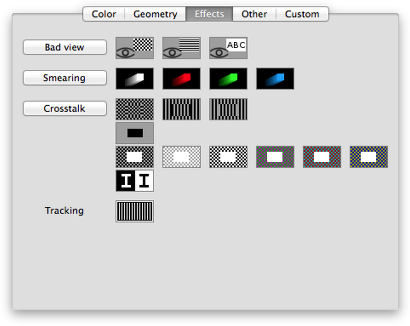
1. Bad view
-
Scrolling chessboard.
Look out about following problems:
- Colored grille templates.
The moving chessboard should be visible and distinguished.
The moving chessboard should be drawn with chosen colors.
- Flickering panel.
The pane under moving chessboard should not flicker.
RGB color space.
-
Scrolling lines.
Look out about following problems:
- Colored grille templates.
The moving lines should be visible and distinguished.
The moving lines should be drawn with chosen colors.
- Flickering panel.
The pane under moving lines should not flicker.
RGB color space.
-
Scrolling text.
Look out about following problems:
- Bold text.
The moving text should not be bold.
It should look with the same weight as the steady text.
- Flickering text.
The pane under moving text should not flicker.
RGB color space for the background color.
-
Tuneups.
- 1st and 2nd colors: all patterns are designed with two colors.
- Scrolling speed: from 1 px / sec to 100 px / sec.
- Pattern size: x1 and x2.
2. Smearing
Compare the front and tail zones of the moving shape (according to the moving direction).
On all monitors these parts are blurred, especially on LCD displays.
- Big zones mean poor picture without details for any moving image.
- Asymmetric zones will change the perception about the shape.
3 test steps - change of the scrolling direction:
- Diagonal
- Horizontal
- Vertical
Tuneups:
- Moving shape:
- Square:
- Observe the fade effect in front and tail edges: smaller fade is better result.
Compare to other edges (edges parallel to the scrolling direction).
- Both edges should fade equally.
- Triangle:
- How big the hollow spot between both triangles is: big spot is bad result.
- Diamond:
- Compare diamond's tips: different tips are bad result.
- Circle:
- How close is the shape of the observed object to a perfect circle.
- How different are colors in the circle's center and periphery: difference is bad.
- Lines:
- How dimmed is the color compared with the color in the circle's' center.
- Moving speed: 7 levels.
Tune the speed until a smooth scroll is reached.
However, try to keep the speed high enough to get the bigger fading zone.
RGB color space.
3. Crosstalk
-
Crosstalk 1-A
There should be a sharp transition between chosen colors.
Look out about following problems in transition zone:
- Streaking.
Long, thin lines of a different shade or color from their surroundings.
- Smearing.
A blurred outline instead of a sharp transition.
RGB color space.
-
Crosstalk 2
Front panel vs. background.
Test templates are prepared to reveal the crosstalk effect.
- Look at left and right side of the front panel.
In a case of crosstalk there will be stripe.
- Change the test step.
Inspect the space between the panels - the effect is most visible here.
- Tuneup the brightness of the background.
The effect is most noticeable on brighter backgrounds - something around 70%.
- Change the color and play with the brightness.
More info.
Shortly, there is a colored panel over a template background.
In some conditions (color, lightness, number of panels) translucent horizontal stripes appear around panel.
For example, stripes can be a bit pink.
Test steps:
- 1 front panel.
- 2 front panels.
- 4 front panels.
Tuneups:
- Front panel color:
- Black, gray, white.
- Red, green, blue.
- Cyan, magenta, yellow.
- Monocolor background:
- Color: white, red, green, blue, cyan, magenta, yellow.
- Brightness.
- Chessboard background:
- Brightness of 1st color.
- Brightness of 2nd color.
There are some different background templates deployed as different tests:
- 2-A.
Initial configuration: black panel on gray background.
- 2-B.
Initial configuration: white panel on black & gray chessboard.
- 2-C.
Initial configuration: white panel on white & gray chessboard.
- 2-D.
Initial configuration: white panel on black & white chessboard.
- 2-E.
Initial configuration: white panel on green & magenta chessboard.
- 2-F.
Initial configuration: white panel on red & cyan chessboard.
- 2-G.
Initial configuration: white panel on blue & yellow chessboard.
RGB color space.
-
Crosstalk 3-A
Chessboard displacement.
There is a panel (1/3 in size) in the middle of the test window.
The panel has the same background template as the window.
In some tests the panel's background is displaced against the window, in other tests it fits perfect.
When the panel is displaced, a thin border appears.
When the panel is not displaced, its border is invisible.
Because of this, four small spots are drawn in the panel's corners.
The panel can move or stay steady in the middle of the window.
Look out about:
- When the panel is not displaced.
The panel should not be distinguished from the window's background.
No borders, no color shades.
Only the four spots in its corners.
There should not be defects in the output image.
- When the panel is displaced.
A tint appears for all the pixel rows that cross the panel,
for example, a translucent pink stripe.
It's because of the crosstalk.
Color space not supported.
-
Crosstalk 3-B, 3-C
Vertical lines displacement.
There is a panel (1/3 in size) in the middle of the test window.
The panel has the same background template as the window.
In some tests the panel's background is displaced against the window, in other tests it fits perfect.
When the panel is displaced, a thin border appears.
When the panel is not displaced, its border is invisible.
Because of this, four small spots are drawn in the panel's corners.
The panel can move or stay steady in the middle of the window.
Look out about:
- When the panel is not displaced.
The panel should not be distinguished from the window's background.
No borders, no color shades.
Only the four spots in its corners.
There should not be defects in the output image.
- When the panel is displaced.
A tint appears for all the pixel rows that cross the panel,
for example, a translucent pink stripe.
It's because of the crosstalk.
The test "Crosstalk 3-B" is the same as "3-C", only colors are exchanged.
Color space not supported.
4. Tracking
Look out about:
- Vertical lines should be sharp and distinguished.
- The background should be black.
- The lines' color should respect the selection in tuneups.
In case of visual disturbance in this pattern:
- Adjust the monitor's tracking or phase settings.
RGB color space.
|
|


