

1. Tune up the locator
The locator can be tuned up in so called Locator center:
Any change of locator settings will show a Sample locator aside from the preferences panel.
Press the "Toggle locator" button to preview the real locator around the mouse.
2. Change the size
Open the locator center.
Drag the sliders next to the "Outer diameter" and "Ring thickness" labels. 
3. Change the color

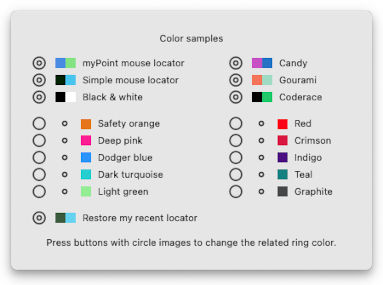
4. Change the color - samples

5. Change the animation
Open the locator center.
Select the "Animated momentary ring" radio button. Drag the sliders next to the "Animation speed" and "Animation repeat" labels. The momentary locator may appear only when the permanent one is not visible.

6. Make it static
Open the locator center.
Select the "Static momentary ring" radio button. Drag the slider next to the "Display time" label. The momentary locator may appear only when the permanent one is not visible.

7. Make it permanent
Open the locator center.
Select the "Permanent ring" checkbox. The momentary locator may appear only when the permanent one is not visible.

|


| ||||||


 A button with two circles will change both outer and inner colors.
 A button with one big circle will change only outer color.
 A button with one small circle will change only inner color.


© 2012-2024 CODERACE
Apple, the Apple logo, App Store, Mac, Mac OS X and macOS are trademarks of Apple Inc.