1. Customize the menu
Open the preferences panel and select the General preferences view.

- Select or deselect highlighted checkboxes. They will show or hide related menu items.
- Open the menu to preview the result.
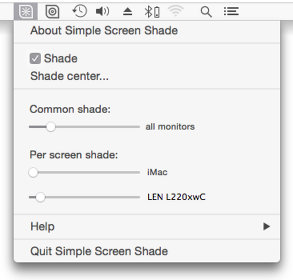
The menu with all items shown:
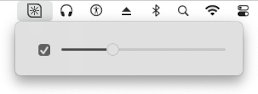
The menu with only the shade checkbox and the common shade slider:
Note:
- When "About Simple Screen Shade" and "Shade center" menu rows are hidden, the preferences panel can be shown this way:
- Relaunch Simple Screen Shade (while it is already running in the background) from the Applications folder.
- When the "Quit Simple Screen Shade" menu row is hidden, the app can be exited from the General preferences panel:
- Open the preferences panel.
- Select General view.
- Click on the "Quit" button.